
How to Add a Dynamic Post Filter in Blogger Without Page Reload

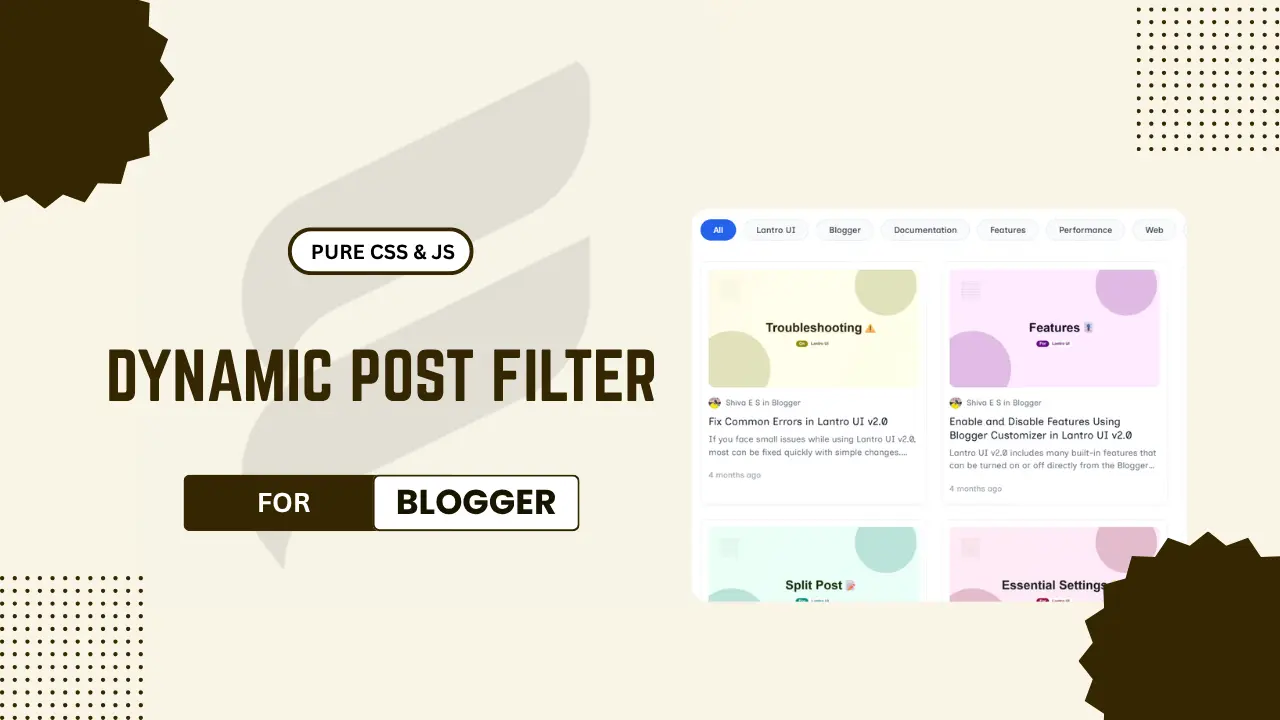
Showing your blog’s latest posts in the normal way in Blogger is good, but as your blog grows, visitors may find it harder to discover the content type they are looking for. A dynamic post filter will improve your blog’s user experience by letting visitors browse articles by label instead of scrolling through multiple pages on your blog.
Most of the modern websites use this type of content section to keep users engaged and encourage them to explore more articles on their website. Whether you run a technology blog, developer blog, tutorial website or any news portal, adding a dynamic post filter will make your blog look organised and professional.
In this guide, you will learn how to add a dynamic post filter in Blogger without any page reload. The design of this element is clean, responsive and looks good on both mobile and desktop devices. So, without wasting much time, let’s check how it works and how to implement this dynamic post filter in your Blogger blog.
Features
- Display posts dynamically without requiring a page reload
- Automatically fetches posts directly from your Blogger feed
- Has label-based content filtering
- Auto-detects labels from your Blogger feed
- Custom Blog URL support
- Option to show only selected categories
- Lazy loads post thumbnails
- No external libraries usage
- Made using pure CSS and JavaScript
- Easy to customize
- Can control the number of posts visible
- Mobile-friendly design
- Responsive design
How Does This Dynamic Post Filter Work?
This dynamic post filter directly fetches posts from the Blogger feed and displays them in a modern card layout. This automatically fetches posts from the feed and creates a scrollable category menu based on available labels. If you need only some of the specific labels, then you can show only them by editing the configuration in JS.
Whenever a user selects a label from the labels list, it instantly shows the content of that label without requiring a page reload. This creates a smoother browsing experience and make easy to switch between labels quickly. The active label is highlighted to make it more user-friendly.
This dynamic post filter also includes additional features like lazy-loading images, skeleton loading animation, relative publish date,author info and load more pagination. Since it only uses Blogger’s feed system and vanilla JavaScript, everything remains lightweight, performance-friendly, customizable and easy to implement across several Blogger templates.
Dynamic Post Filter Demo
How to Add This Dynamic Post Filter to Your Blogger Blog?
- First of all, go to your Blogger dashboard
- Click the “Theme” option from the sidebar
- Click the drop-down icon near the “Customise” button
- Click the “Edit HTML” option from the drop-down menu
Adding CSS For Dynamic Post Filter
- Find
]]></b:skin>Then paste the following CSS just above it
/* Dynamic Post Filtering CSS (coshix.in) */
.dyn-categories{display:flex;gap:12px;overflow-x:auto;white-space:nowrap;padding-bottom:10px;margin-bottom:24px;scrollbar-width:none}
.dyn-categories::-webkit-scrollbar{display:none}
.filter-btn{padding:8px 20px;background:#f9fafb;border:1px solid #e5e7eb;border-radius:30px;cursor:pointer;font-size:14px;font-weight:500;color:#374151;transition:.2s;font-family:inherit}
.filter-btn.active,.filter-btn:hover{background:#2563eb;color:#fff;border-color:#2563eb}
.dyn-grid{display:grid;grid-template-columns:repeat(auto-fill,minmax(300px,1fr));gap:24px;margin-bottom:30px}
.dyn-loader{grid-column:1/-1;text-align:center;padding:40px;color:#6b7280;font-size:15px;font-family:inherit}
.dyn-card{background:#fff;border:1px solid #f0f0f0;border-radius:12px;padding:12px;display:flex;flex-direction:column;transition:transform .2s;box-shadow:0 2px 4px rgba(0,0,0,.02);height:100%}
.dyn-card:hover{transform:translateY(-4px)}
@keyframes dyn-shimmer{0%{background-position:-200% 0}100%{background-position:200% 0}}
.dyn-img-wrap{display:block;width:100%;aspect-ratio:16/9;border-radius:8px;background:linear-gradient(90deg,#f3f4f6 25%,#e5e7eb 50%,#f3f4f6 75%);background-size:200% 100%;animation:dyn-shimmer 1.5s infinite;overflow:hidden;position:relative}
.dyn-image{width:100%;height:100%;object-fit:cover;opacity:0;transition:opacity .3s ease;display:block}
.dyn-image.loaded{opacity:1}
.dyn-author-row{display:flex;align-items:center;gap:8px;margin:12px 0 8px !important;font-size:13px;color:#6b7280;font-family:inherit}
.dyn-author-img{width:20px;height:20px;border-radius:50%;object-fit:cover}
.dyn-title{font-size:17px;font-weight:700;margin:0 0 6px !important;padding:0 !important;line-height:1.4;font-family:inherit}
.dyn-title a{text-decoration:none;color:#111827}
.dyn-desc{font-size:14px;color:#6b7280;margin:0 !important;padding:0 !important;display:-webkit-box;-webkit-line-clamp:2;-webkit-box-orient:vertical;overflow:hidden;line-height:1.5;font-family:inherit}
.dyn-time{font-size:13px;color:#9ca3af;margin-top:auto;padding-top:14px;font-family:inherit}
.dyn-lm-wrap{text-align:center;margin-top:10px}
.dyn-lm-btn{padding:10px 30px;background:#fff;border:1px solid #e5e7eb;border-radius:30px;cursor:pointer;font-size:15px;font-weight:600;color:#374151;transition:.3s;display:none;font-family:inherit}
.dyn-lm-btn:hover{background:#f9fafb}
.dyn-lm-btn:disabled{opacity:.6;cursor:not-allowed}
/* Remove if not Using dark mode (Replace "dark-mode" with your theme's dark mode class) */
.[ul:green]dark-mode[/ul] .filter-btn{background:#2d2e38;border-color:#2d2e38;color:#a0a0a8}
.[ul:green]dark-mode[/ul] .filter-btn.active{background:#5c67f2;border-color:#5c67f2;color:#fff}
.[ul:green]dark-mode[/ul] .dyn-card{background:#1b1c23;border-color:#2d2e38;box-shadow:none}
.[ul:green]dark-mode[/ul] .dyn-img-wrap{background:linear-gradient(90deg,#2d2e38 25%,#3f404d 50%,#2d2e38 75%);background-size:200% 100%}
.[ul:green]dark-mode[/ul] .dyn-author-row{color:#9ca3af}
.[ul:green]dark-mode[/ul] .dyn-title a{color:#f3f4f6}
.[ul:green]dark-mode[/ul] .dyn-desc{color:#9ca3af}
.[ul:green]dark-mode[/ul] .dyn-time{color:#6b7280}
.[ul:green]dark-mode[/ul] .dyn-lm-btn{background:#1b1c23;border-color:#2d2e38;color:#e5e7eb}
.[ul:green]dark-mode[/ul] .dyn-lm-btn:hover{background:#2d2e38}
Adding Dynamic Post Filter HTML Code
- Paste the following HTML code where you need to show the Dynamic post filter post section in your theme (e.g., below
</header>)
<div class="dyn-filter-container">
  <div class="dyn-categories" id="dyn-categories"></div>
  <div class="dyn-grid" id="dyn-grid"></div>
  <div class="dyn-lm-wrap">
    <button class="dyn-lm-btn" id="dyn-load-more" onclick="window.loadMore()">Load More</button>
  </div>
</div>
Adding Dynamic Post Filter JS
- Find the
</body>tag, then paste the following JS just above it
<script>
/* ==========================================
    NAME: Dynamic Post Filtering
    BY: coshix.in
    FOR: Blogger
    =========================================
    CONFIGURATION (EDIT THESE VALUES)
   ==========================================*/
const dynConfig = {
  // Add your Blogger URL here.
  // Leave empty "" to auto-detect all posts from current blog.
  blogUrl: "[hl:blue]https://the-lantro-ui.blogspot.com[/hl]",

  // Number of posts to show per page/click
  maxPosts: [hl:blue]6[/hl],

  // Specific categories to show (e.g. ["Blogger", "SEO", "News"]).
  // Leave empty [] to auto-detect all categories.
  customCategories: [hl:blue][][/hl],

  // Default thumbnail if a post has no image
  defaultImg: "[hl:blue]https://via.placeholder.com/800x450?text=No+Image[/hl]"
};
/* ========================================== */

/* Risky Edit Section */document.addEventListener("DOMContentLoaded",()=>{const e=document.getElementById("dyn-grid"),t=document.getElementById("dyn-categories"),n=document.getElementById("dyn-load-more");let a=1,r="";async function c(c,o=!1,s=null){o?(n.textContent="Loading...",n.disabled=!0):(a=1,r=c,e.innerHTML='<div class="dyn-loader">Loading posts...</div>',n.style.display="none",s&&(document.querySelectorAll(".filter-btn").forEach((e=>e.classList.remove("active"))),s.classList.add("active")));const i=dynConfig.blogUrl?dynConfig.blogUrl.replace(/\/$/,""):"";let d=`${i}/feeds/posts/summary?alt=json&max-results=${dynConfig.maxPosts}&start-index=${a}`;r&&(d=`${i}/feeds/posts/summary/-/${encodeURIComponent(r)}?alt=json&max-results=${dynConfig.maxPosts}&start-index=${a}`);try{const s=await new Promise(((e,t)=>{const n="cb_"+Date.now()+"_"+Math.random().toString(36).substr(2,5);window[n]=a=>{delete window[n],document.head.removeChild(r),e(a)};const r=document.createElement("script");r.src=d.replace("alt=json","alt=json-in-script")+"&callback="+n,r.onerror=()=>t(new Error("Network Error")),document.head.appendChild(r)})),l=s.feed.entry||[],u=parseInt(s.feed.openSearch$totalResults.$t,10);if(o||(e.innerHTML=""),!l.length&&!o)return void(e.innerHTML='<div class="dyn-loader">No posts found.</div>');let m="";l.forEach((e=>{const t=e.title.$t;let n="#";e.link.forEach((e=>{"alternate"===e.rel&&(n=e.href)}));const a=e.summary?e.summary.$t.trim():"";let r=dynConfig.defaultImg;e.media$thumbnail&&(r=e.media$thumbnail.url.replace(/\/[swh]\d+(-[a-z0-9-]+)?\//i,"/w800-h450-c/").replace(/\=[swh]\d+(-[a-z0-9-]+)?/i,"=w800-h450-c"));const c=e.author[0].name.$t,o=e.author[0].gd$image.src.replace(/\/[swh]\d+(-[a-z0-9-]+)?\//i,"/s40-c/"),s=e.category&&e.category.length?" in "+e.category[0].term:"",i=(e=>{const t=Math.floor((new Date-new Date(e))/1e3);let n=t/2592e3;return n>1?Math.floor(n)+" months ago":(n=t/86400)>1?Math.floor(n)+" days ago":(n=t/3600)>1?Math.floor(n)+" hours ago":(n=t/60)>1?Math.floor(n)+" mins ago":"Just now"})(e.published.$t);m+=`<article class="dyn-card"><a href="${n}" class="dyn-img-wrap"><img class="dyn-image" src="${r}" alt="${t}" loading="lazy" onload="this.classList.add('loaded')"/></a><div class="dyn-author-row"><img class="dyn-author-img" src="${o}" alt="${c}"/><span>${c}${s}</span></div><h3 class="dyn-title"><a href="${n}">${t}</a></h3><p class="dyn-desc">${a}</p><div class="dyn-time">${i}</div></article>`})),o?e.insertAdjacentHTML("beforeend",m):e.innerHTML=m,!o&&!r&&function(c){let a=[];dynConfig.customCategories&&dynConfig.customCategories.length?a=dynConfig.customCategories.map((e=>({term:e}))):c&&(a=c),a.length&&function(e){let n='<button class="filter-btn active" onclick="window.filterByCat(\'\', false, this)">All</button>';e.forEach((e=>{n+=`<button class="filter-btn" onclick="window.filterByCat('${e.term}', false, this)">${e.term}</button>`})),t.innerHTML=n}(a)}(s.feed.category),a+dynConfig.maxPosts-1<u?(n.style.display="inline-block",n.textContent="Load More",n.disabled=!1):n.style.display="none"}catch(t){o||(e.innerHTML='<div class="dyn-loader">Error loading posts. Make sure the URL is public.</div>'),console.error(t)}}window.filterByCat=c,window.loadMore=()=>{a+=dynConfig.maxPosts,c(r,!0)},c("")});
</script>FAQ (Frequently Asked Questions)
Does this post filter work without page reload?
Yes, posts are loaded dynamically using JavaScript and Blogger feeds, allowing visitors to browse categories without refreshing the page.
Can I show only specific categories?
Yes, you can use the customCategories option in the configuration to display only selected Blogger labels instead of loading all categories automatically.
Will this work on any Blogger template?
In most cases, yes. The code is designed to work independently and can be added to almost any Blogger theme with minimal customisation.
Can I change the number of posts displayed?
Yes, simply modify the maxPosts value in the configuration section to control how many posts are loaded per click.
What happens if a post does not have a thumbnail image?
The script automatically displays the default image specified in the defaultImg setting, ensuring a consistent layout.
Does this support dark mode?
Yes, dark mode styles are included. You can adjust or remove them depending on your Blogger theme’s dark mode implementation.
Conclusion
The Dynamic Post Filter is one of the most useful features for your website users because it helps them easily navigate the content according to their interests instead of browsing through the archive page, index page and other pages in your blog. This creates a better browsing experience for them and encourages them to explore more content on your blog.
As your blog continues growing and new categories are added, keeping your blog well organised is one of the important steps to improve website ranking. This label-based content filtering helps you to present your blog articles in a structured manner to your users. This was very useful for a blog which publish tutorials, news updates, reviews, and other content across multiple topics.
With its modern design, responsive layout and easy-to-customise options, it can be adopted for a wide variety of Blogger websites. I hope this tutorial helps you to implement a dynamic post filter in your Blogger blog. If you have any doubts related to this guide, don’t forget to drop a comment below about it. Thanks for visiting, and have a nice day!
Comments